Feedboss

9 Best Taplio Alternatives to Try in 2026

Taplio isn’t a bad tool. But it’s not the right tool for everyone.

While using Taplio, I’ve come across a few limitations: monthly costs that add up fast, automation features that make me nervous about account safety, and AI-generated content that sounds more like a LinkedIn AI bot than my actual voice.

If you’re reading this, you’re probably feeling at least one of those pain points. You want a LinkedIn tool that helps you grow without the constant worry about whether you’re overpaying or one automation away from a platform warning.

This list includes the 9 best Taplio alternatives that are safer, more affordable, or better suited for creators who want to sound like themselves. 

Let’s find the one that fits your workflow.

Top 9 Taplio Alternatives 

After testing 20+ LinkedIn tools, I’ve narrowed it down to these 9 alternatives. Each solves specific problems Taplio users face.

1. FeedBoss – The LinkedIn tool you didn’t know you needed until now

It’s built for creators who want to grow on LinkedIn without overpaying, overcomplicating things, or relying on sketchy automation that gets their account flagged.

FeedBoss offers straightforward monthly and yearly plans with no hidden costs or credit limits.

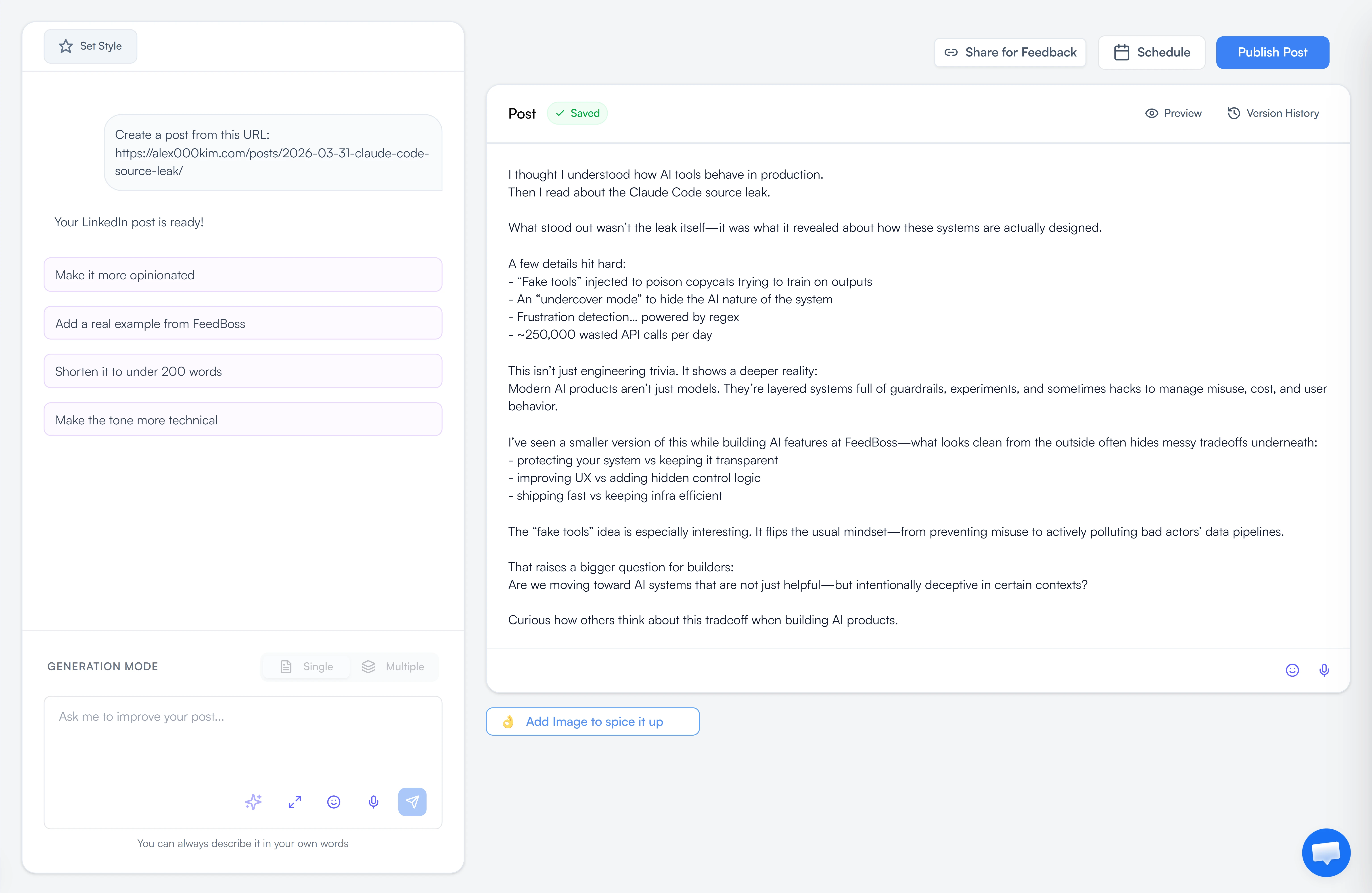
But here’s the thing: it’s not a basic tool trying to compete on price alone. You get unlimited AI post-generation with voice training that learns how you write.

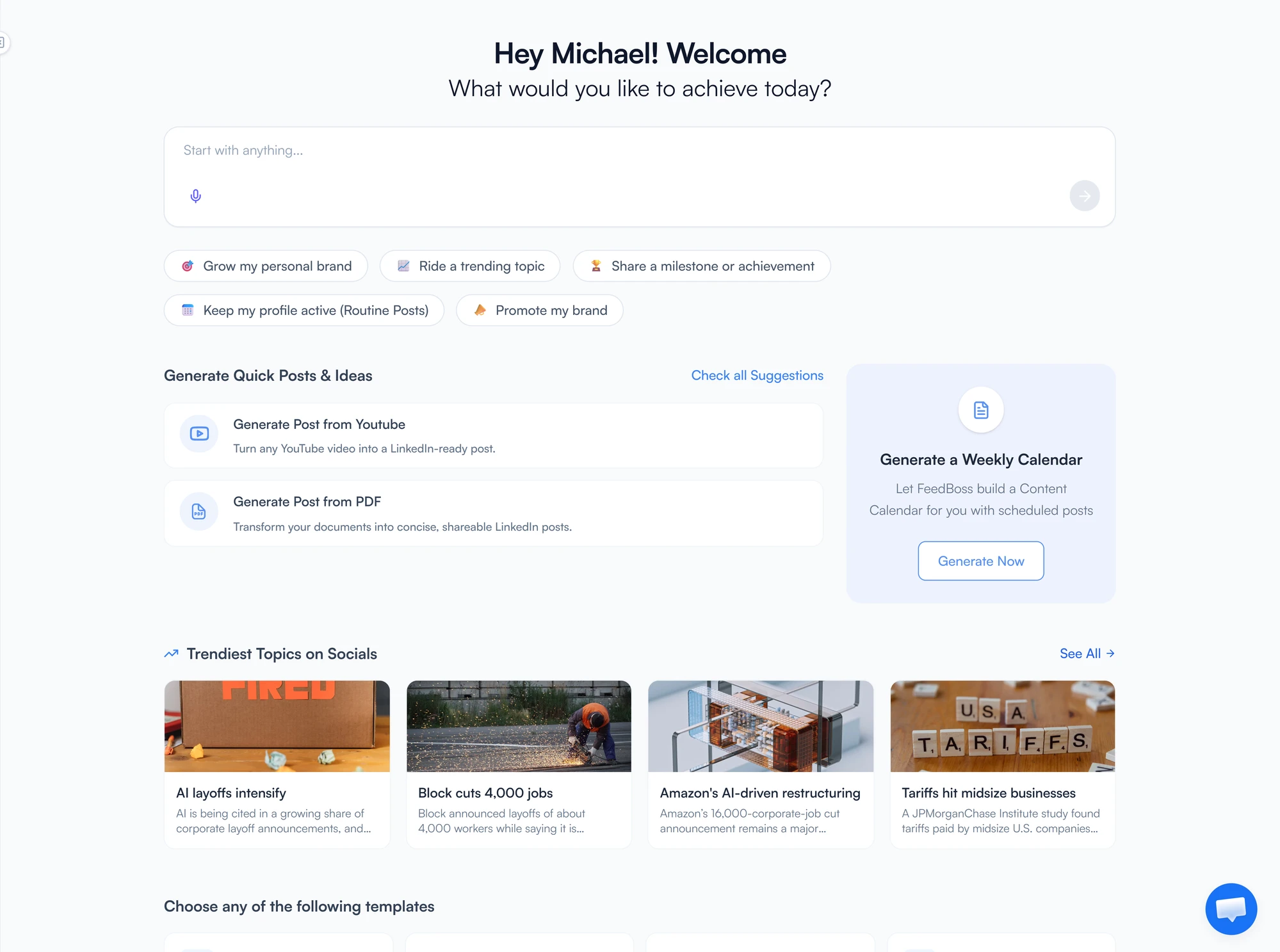
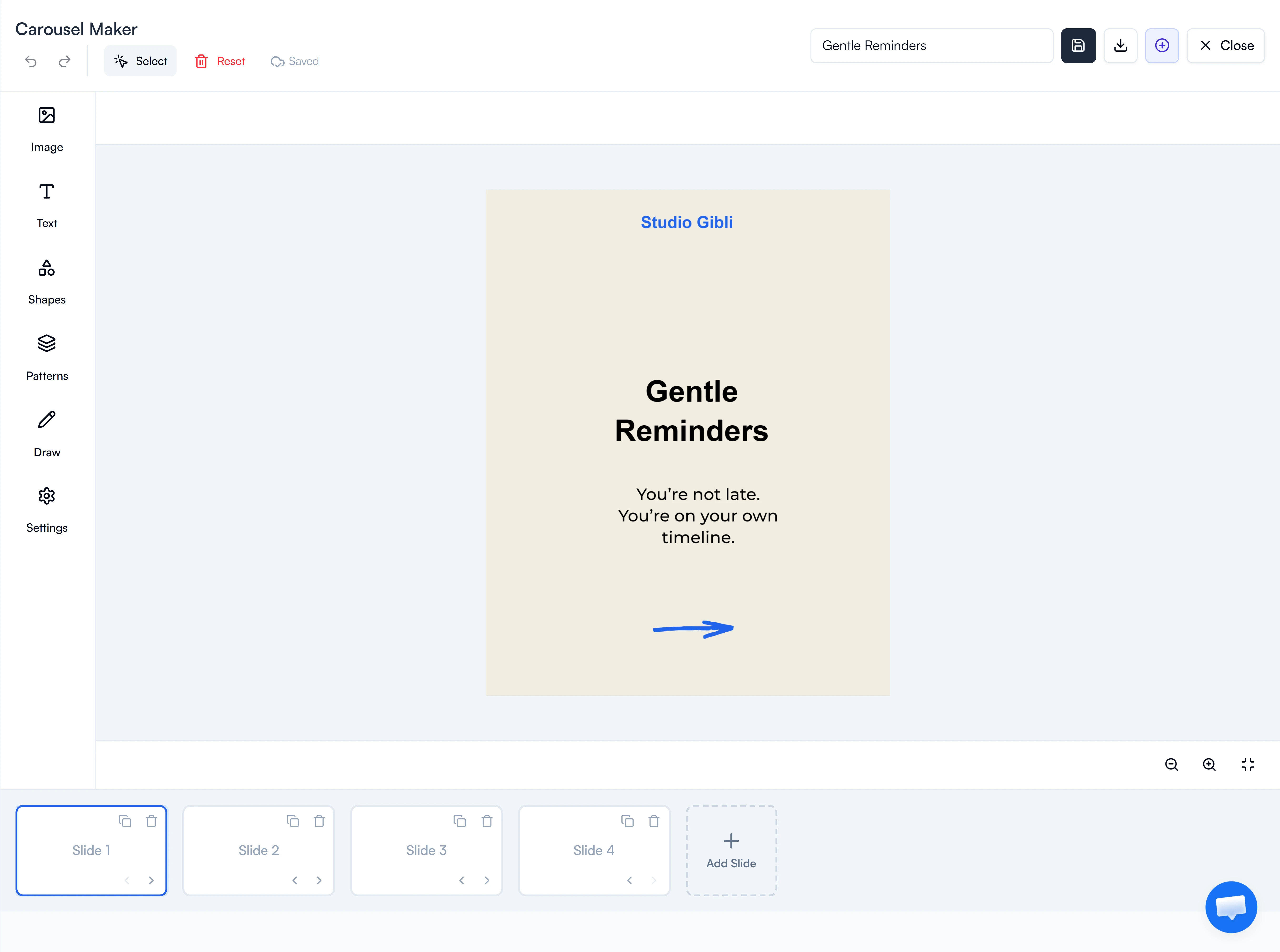
The carousel maker includes templates, an editor, and AI assistance—eliminating the need for external design tools. Content repurposing turns your YouTube videos, blogs, and PDFs into LinkedIn posts without starting from scratch.

The viral post database grows daily, giving you fresh inspiration when you’re stuck. Bulk scheduling lets you plan weeks of content in one session. And the engagement tools—custom lists plus AI-powered comments—are included in every plan, not locked behind premium tiers.

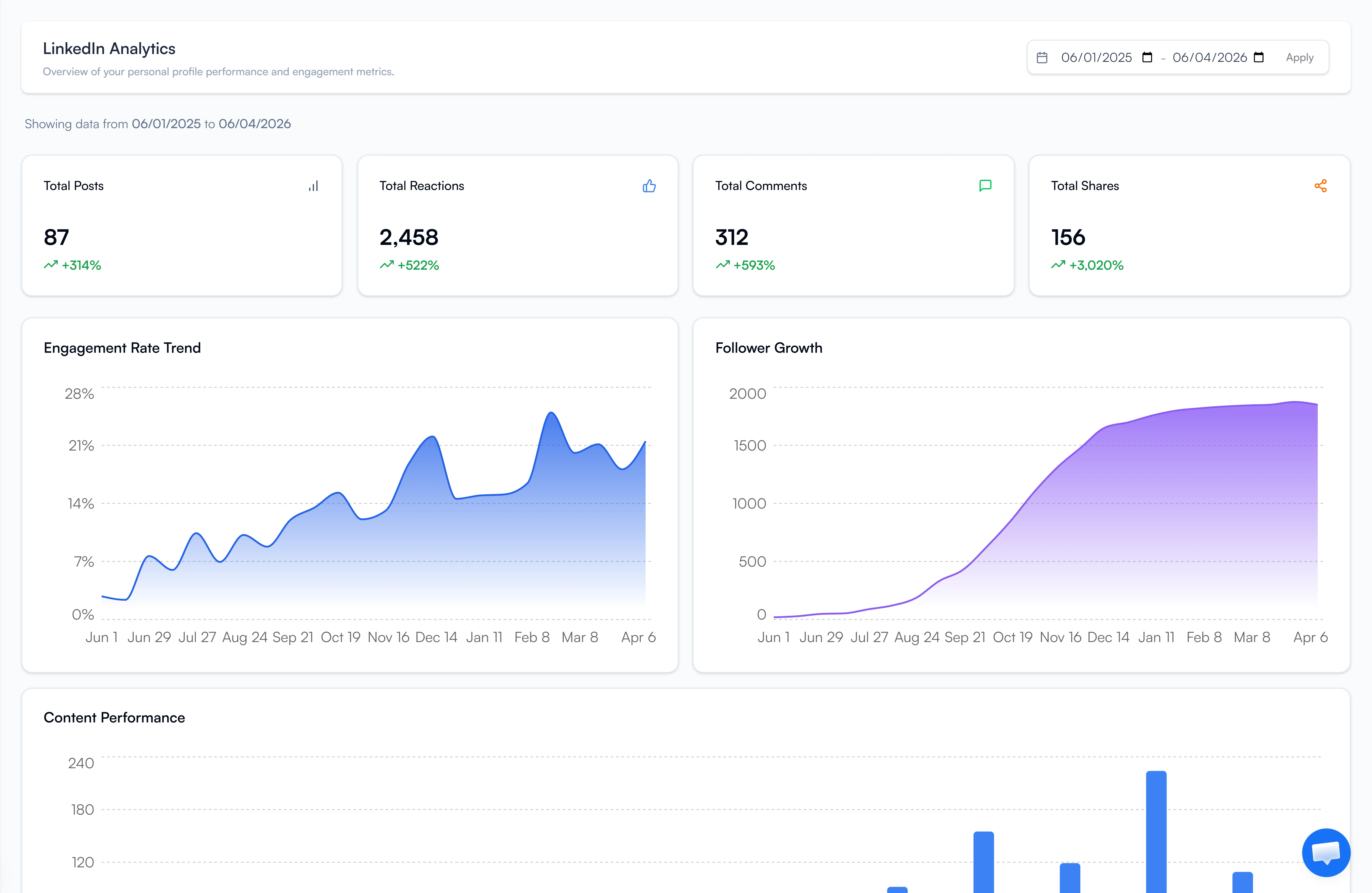
The analytics dashboard tracks follower growth and engagement trends, so you can see what’s working. And it’s fully LinkedIn TOS compliant—no scraping, no session hijacking, zero ban risk.

Best suited for: Creators, founders, and marketers who want serious LinkedIn growth tools without the subscription fatigue.

Key Features

Here’s what you get with FeedBoss right out of the box:

  • AI Post Generator – Unlimited posts that match your writing style
  • Carousel Maker – Built-in templates, editor, and AI to create scroll-stopping carousels
  • Content Repurposing – Turn YouTube videos, blogs, and PDFs into LinkedIn posts
  • Viral Post Database – Fresh inspiration added daily
  • Bulk Scheduling – Plan weeks of content in one sitting
  • Engagement Tools – Custom lists and AI-powered comments included in every plan
  • Multi-user Access – Great for teams without the agency price tag


Why FeedBoss Is the Better Taplio Alternative

People leave Taplio for specific reasons. FeedBoss solves them all:

1. Unlimited Content Creation

Taplio limits you to credits. Run out mid-month? Pay more or wait.

FeedBoss gives you unlimited AI posts, carousels, and repurposing. Create as much as you need, whenever you need it.

2. LinkedIn-Safe Technology

Taplio’s automation tactics—browser extensions, cookie scraping, session hijacking—trigger LinkedIn warnings.

FeedBoss uses compliant, API-based methods. Your account stays safe.

3. Everything Included, Not Paywalled

Taplio locks features behind higher tiers. Want engagement tools? Upgrade. Need analytics? Pay more.

FeedBoss includes a carousel maker, engagement tools, and analytics in every plan. Even the $49 starter tier gets you content creation, repurposing, and scheduling.

4. Built for Real Creators, Not Data Scientists

Taplio feels like a data dashboard that happens to post content.

FeedBoss is built for creators who want to show up, post great content, and grow—without needing a PhD in analytics.

5. Better Value for Your Money

Taplio costs $39–$199 every month with credit limits and feature restrictions.

FeedBoss starts at $29/month with unlimited content creation and no credit caps. Or save 20% with yearly billing—$278/year vs Taplio’s $468/year minimum.

Pros

What makes FeedBoss worth considering:

  • Affordable monthly and yearly plans
  • Unlimited AI content creation
  • Learns and adapts to your voice
  • Built-in carousel maker saves hours
  • LinkedIn TOS compliant—zero ban risk
  • Multiple premium templates included
  • Free onboarding support

Cons

A few limitations to keep in mind:

  • No mobile app (but the website works as an installed app)
  • Limited analytics compared to pricier tools

Pricing

FeedBoss offers three plans with monthly and yearly options:

Starter – $29/month or $278/year:

  • AI post generator (unlimited)
  • Content repurposing tools
  • Viral post database access
  • Basic scheduling
  • 1 user account

Professional – $59/month or $556/year:

  • Everything in Entry Level
  • Carousel maker with templates
  • Bulk scheduling
  • Engagement tools with custom lists
  • AI comment generator
  • 3 user accounts

Agency – $149/month or $1,430/year:

  • Everything in Mid Tier
  • Full analytics dashboard
  • Priority support
  • White-label options
  • Unlimited user accounts
  • Client workspace management

7-day free trial available for all tiers


2. Supergrow – LinkedIn platform built for creators who want to grow safely, consistently, and authentically

taplio-alternative-supergrow

Here’s the problem with most LinkedIn tools—they use browser extensions, cookie scraping, or session hijacking. LinkedIn hates that. Users get warnings. Some get banned.

Supergrow doesn’t touch any of that. It uses proper API-based publishing. Your account stays safe.

The AI learns your writing style through its Personal Writing Styles feature. Feed it your past posts, and it picks up your tone, structure, and phrasing. When you generate content, it doesn’t sound like a template. It sounds like you wrote it.

The first comment scheduler is smart. It lets you post your main content, then drops a separate comment with your CTA or extra info. This keeps your post clean while still boosting engagement—LinkedIn’s algorithm loves early comment activity.

Best suited for: Solopreneurs, ghostwriters managing client accounts, and creators who want a clean, focused tool without the bloat.

Key Features

Supergrow packs these essential features for LinkedIn creators:

  • AI Post Generator – Trained on your voice and tone
  • Content Calendar & Kanban Board – Visual planning and drag-and-drop workflow
  • Carousel Maker – Create branded carousels without leaving the platform
  • First-Comment Scheduler – Boost reach by scheduling CTAs and value-adds
  • Voice-to-Post – Speak your thoughts, get publish-ready content
  • Swipe File + Viral Feed – Save favorites and browse trending posts
  • Engage Lists – Build custom lists and engage with AI-powered comments
  • Analytics – Track growth and engagement trends

Pros

Why creators like Supergrow:

  • AI trained on your authentic voice
  • Compliance-first (no account risk)
  • First-comment scheduling for better reach
  • Built-in carousel maker
  • Voice-to-post feature
  • Great for freelancers and agencies
  • Affordable pricing with no credit limits

Cons

What Supergrow doesn’t offer yet:

  • LinkedIn-only (no multi-platform scheduling)
  • No mobile app yet (web/desktop only)

Pricing

Supergrow keeps it simple with two monthly plans:

Starter – $19/month:

  • AI post generator trained on your voice
  • Content calendar & Kanban board
  • Post scheduling
  • Voice-to-post feature
  • Swipe file for inspiration
  • 1 user account

Pro – $39/month:

  • Everything in Starter
  • Carousel maker
  • First-comment scheduler
  • Engagement lists & AI comments
  • Analytics dashboard
  • Viral inspiration feed
  • Multi-user access

7-day free trial with a 20% annual discount available.


3. Socialsonic – All-in-one LinkedIn growth platform for creators who want to move fast

Socialsonic combines content creation with trend intelligence. The Viral Posts Alert monitors trending topics across your industry and flags them before they get oversaturated.

This isn’t just reporting what went viral last week. It analyzes engagement velocity, share patterns among influential accounts, and topic clustering to catch trends that are gaining momentum right now. You get a first-mover advantage.

The AI Content Studio works across multiple formats—posts, long-form articles, comments—using consistent voice parameters. Your brand stays aligned whether you’re writing a thought leadership piece or commenting on someone else’s post.

The smart scheduling analyzes your specific audience’s activity patterns. It tells you when your connections actually engage—which, for B2B pros, is often counterintuitive.

Best suited for: Marketers, growth teams, and creators who want to scale content without sacrificing relevance.

Key Features

Socialsonic combines trend intelligence with content creation:

  • Viral Posts Alert – Real-time alerts on trending topics
  • Content Ideas – Daily suggestions based on your industry
  • AI Content Studio – Create posts, articles, and comments
  • Smart Scheduling – Auto-posts when your audience is active
  • Analytics Dashboard – Track engagement, growth, and content performance
  • Engagement Autopilot – Auto-interact with target audience posts

Pros

Why trend-conscious creators like Socialsonic:

  • Functional calendar view
  • Regular feature updates
  • Excellent customer support
  • Great for riding trends

Cons

Potential dealbreakers for some users:

  • Limited to LinkedIn only
  • It can be overwhelming for beginners

Pricing

Socialsonic scales from solo creators to agencies:

Pro – $20/month:

  • Viral posts alert system
  • AI content studio
  • Daily content ideas
  • Smart scheduling
  • Basic analytics dashboard
  • 1 user account

Team Accelerator – $75/month:

  • Everything in Pro
  • Advanced analytics
  • Engagement autopilot
  • Team collaboration
  • 3 user accounts
  • Priority support

Agency Powerhouse – $200/month:

  • Everything in Team Accelerator
  • White-label options
  • Client workspaces
  • Advanced automation
  • 10 user accounts
  • Dedicated account manager


4. Blabigo- Built for creators who need structure and organization in their LinkedIn content strategy

The built-in editorial calendar helps you organize posts into different sections and categories. You can plan content themes, track what you’ve published, and see gaps in your posting schedule. This matters when you’re juggling multiple content angles or managing a long-term brand strategy.

The advanced text formatter gives you full control over LinkedIn text styling—bold, italics, and underline. LinkedIn’s native editor is limited, but Blabigo’s formatter ensures your posts look professional across desktop and mobile.

Post preview shows you exactly how the content will appear before it goes live. No surprises, no broken formatting.

The advanced metrics track performance details that help you optimize strategy over time. You can see which post types, topics, and formats drive the most engagement with your specific audience.

Best suited for: Personal brand builders and content strategists who need structure and organization.

Key Features

Blabigo brings organization and planning to LinkedIn content:

  • Content Calendar & Categorization – Organize posts into sections and plan strategy
  • Advanced Text Formatter – Apply bold, italics, and underline with precision
  • Post Preview – View content exactly as it will appear before publishing
  • Advanced Metrics – Track performance and optimize based on data
  • Video Generation – Create videos to diversify your content mix
  • Virality Insights – Tips for creating high-reach posts based on trends

Pros

What makes Blabigo valuable for strategic creators:

  • Strong organizational tools
  • Built-in text formatting
  • Post preview before publishing
  • Video generation feature
  • Focus on personal branding

Cons

Challenges you might face with Blabigo:

  • Learning curve for all features
  • Pricing is not as transparent
  • The feature set can feel overwhelming initially

Pricing

Blabigo uses custom pricing tailored to your needs:

Custom pricing – Contact for details:

  • Content calendar & categorization
  • Advanced text formatter
  • Post preview (desktop & mobile)
  • Advanced metrics & analytics
  • Video generation tools
  • Virality insights
  • AI post generator
  • Multiple user accounts (varies by plan)
  • Team collaboration features
  • Priority support (higher tiers)


5. Bluecast – Specializes in turning your existing content into LinkedIn posts

Got a YouTube video, blog article, podcast episode, or PDF report? Bluecast transforms it into LinkedIn-optimized posts and carousels. It doesn’t just pull quotes or create summaries.

It restructures content to match how people consume content on LinkedIn—breaking down complex arguments into digestible segments, reformatting data visualizations for mobile, and adapting narrative flow for social media attention spans.

The carousel creation workflow eliminates the need for Canva or Figma. Bluecast provides templates with brand customization (colors, fonts, logo placement) and an AI-assisted layout system that optimizes information hierarchy for swipeable content.

The inspiration finder shows high-performing carousels and post examples from top creators. You can identify patterns—like noticing that 5-slide educational carousels with data visualization outperform 10-slide theoretical frameworks in your sector.

Best suited for: B2B marketers and thought leaders who want to turn long-form content into LinkedIn-ready posts.

Key Features

Bluecast specializes in content repurposing and creation:

  • AI Post Generator – Turns ideas into posts quickly
  • Content Repurposing – Convert videos, blogs, audio, and PDFs into posts
  • Inspiration Finder – Browse high-performing posts for ideas
  • Post Editor – Format with bold, line breaks, and perfect spacing
  • Scheduling System – Queue weeks of content and auto-post at peak times

Pros

Why content repurposers love Bluecast:

  • Super intuitive interface
  • Quick content generation
  • Great for repurposing
  • Maintains a consistent presence

Cons

What’s missing from Bluecast:

  • Limited to content creation and scheduling
  • No built-in analytics yet
  • Word generation limits

Pricing

BlueCast offers two straightforward pricing plans:

Pro Plan – $29/month:

  • AI post generator
  • Content repurposing (YouTube, blogs, audio, PDFs)
  • Carousel maker with templates
  • Post editor with formatting
  • Inspiration finder
  • Smart scheduling system
  • 50,000 words per month
  • 1 user account

Growth Plan – $49/month:

  • Everything in Pro Plan
  • 75,000 words per month
  • Priority AI processing
  • Advanced carousel templates
  • Team collaboration features
  • 3 user accounts
  • Priority support


6. AuthoredUp – Solves a specific problem: LinkedIn’s formatting is broken

AuthoredUp fixes this with a real-time preview. You see exactly how your post looks on desktop and mobile before you publish. No more formatting surprises.

The template library has 200 hooks and 100 CTAs optimized for LinkedIn’s algorithm. These aren’t generic “Click here” prompts.

They’re tested patterns, question frameworks that drive comments, story hooks that reduce scroll abandonment, CTAs that generate profile visits without sounding pushy.

The post history feature captures everything you’ve published. You can compare performance across different formatting styles, hook types, and content lengths.

Best suited for: Thought leaders, consultants, and ghostwriters who want polished posts without relying on AI generation.

Key Features

AuthoredUp focuses on the essentials for post quality:

  • Post Formatting Tools – Custom spacing, line breaks, lists, emojis
  • Template Library – 200 hooks and 100 CTAs ready to use
  • Post Preview – See exactly how your post looks before publishing
  • Content Enhancement – Better hooks, cleaner formatting
  • Basic Analytics – Track performance and reuse high-performing posts

Pros

Why formatting-focused creators prefer AuthoredUp:

  • Templates save time
  • Polishes your writing instead of generating it
  • Real-time preview
  • Great for maintaining authenticity

Cons

What you won’t find in AuthoredUp:

  • No integrations
  • Can’t engage with posts directly
  • Limited to text posts

Pricing

AuthoredUp offers straightforward pricing for individuals and teams:

Individual – $19.95/month:

  • Advanced post formatting tools
  • Template library (200 hooks, 100 CTAs)
  • Real-time post preview (desktop & mobile)
  • Post history & analytics
  • Draft management
  • 1 LinkedIn pro

Business – $14.95/user per month:

  • Everything in the Individual
  • Team collaboration features
  • 3+ LinkedIn profiles
  • Bulk discount pricing
  • Shared templates
  • Performance tracking across profiles


7. MagicPost – Helps you skip the blank page problem

MagicPost is built for speed. You give it a topic, URL, or prompt, and it generates a complete post in seconds.

The AI is trained on high-performing LinkedIn content, so it knows what works—optimal post length, readability formatting, engagement hooks. It doesn’t waste time overthinking structure. It just produces.

The voice-matching system learns from your edits. Every time you refine a draft, it picks up on what you changed and why. Over time, the output gets closer to how you actually write.

The content performance optimizer gives real-time feedback while you draft. If your hook is weak, it tells you. If you’re using jargon that kills readability, flag it. You get specific suggestions before you publish.

The industry intelligence feature adjusts tone based on your field. Legal content stays formal. Marketing posts get more dynamic. Technical posts balance accessibility with credibility.

Best suited for: Solo creators, founders, and marketers who want consistency without overcomplicating their workflow.

Key Features

MagicPost delivers speed-focused content creation tools:

  • AI Post Generator – Turn ideas into posts in seconds
  • Content Performance Optimizer – Real-time suggestions based on what works
  • One-Click Formatting – Transform text walls into readable posts
  • Voice Matching – Learns your style, quirks, and personality
  • Industry Intelligence – Adapts to your industry automatically

Pros

What makes MagicPost a solid choice for busy creators:

  • Generates content fast
  • Actually sounds like you
  • Dead simple to use
  • Excellent formatting tools
  • Learns from your edits

Cons

Areas where MagicPost falls short:

  • Can’t engage with other posts
  • Limited customization
  • No integrations

Pricing

MagicPost offers three plans based on post volume and team needs:

Starter – $39/month:

  • AI post generator
  • Voice matching technology
  • One-click formatting
  • Content performance optimizer
  • Industry intelligence
  • 30 posts per month
  • 1 user account

Creator – $59/month:

  • Everything in Starter
  • Unlimited post generation
  • Advanced voice training
  • Priority AI processing
  • Post scheduling
  • 1 user account

Enterprise – $109/month:

  • Everything in Creator
  • 5 user accounts
  • Team collaboration
  • Shared templates
  • Analytics dashboard
  • Priority support


8. EasyGen – Helps you post more often

The AI is trained specifically on high-performing LinkedIn posts. It knows what works—structure, hooks, engagement triggers. You input a topic or headline, and it generates a ready-to-publish draft in seconds.

The Topic & Idea Generator pulls data from Google Trends, Reddit, Twitter, and LinkedIn to surface relevant angles and discussion points. This cross-platform intelligence helps you find content angles before they become oversaturated on LinkedIn.

Style customization lets you switch between professional, casual, and thought-leadership tones without detailed prompt engineering. Useful if you know your audience but lack copywriting experience.

The browser extension eliminates context-switching. You can create content and save drafts directly in your workflow without jumping between tabs.

Best suited for: Solo creators, consultants, and busy professionals who need volume without the time investment.

Key Features

EasyGen keeps things simple with focused functionality:

  • AI-Powered Post Generation – Trained on top LinkedIn posts
  • Topic & Idea Generator – Pulls ideas from Google, Reddit, Twitter
  • Style Customization – Adjust tone to match your voice
  • Content Calendar & Drafts – Organize ideas and plan posts
  • Browser Extension – Write and save content without switching tools

Pros

What EasyGen does exceptionally well:

  • Very fast and beginner-friendly
  • Great for trend-based content
  • Minimal learning curve
  • Clean draft management

Cons

Where EasyGen shows its limitations:

  • Output needs manual editing
  • No built-in analytics

Pricing

EasyGen offers a single plan:

Single tier – Contact EasyGen for Pricing:

  • AI-powered post generation
  • Topic & idea generator
  • Style customization
  • Content calendar & drafts
  • Browser extension
  • Cross-platform idea aggregation
  • Unlimited post creation
  • 1 user account


Conclusion

You’re not looking for “another LinkedIn tool.” You’re looking for safety, consistency, and a platform that helps you grow without risking your account.

The 9 alternatives above each solve different problems. But if you want one tool that covers everything— unlimited content, compliance, and real value, FeedBoss is the smartest move.

You pay once. You own it forever. And you get everything you need to grow on LinkedIn without monthly fees draining your budget.

Pick your tool. Start posting. Show up consistently.

The people winning on LinkedIn aren’t the ones with the best tools. They’re the ones who don’t quit.

Grow Your Professional Presence on LinkedIn