AI LinkedIn Post Generator, Carousel Maker & Analytics Tool

Most people treat LinkedIn like a megaphone. They shout into the void, hoping someone hears them.
The creators who build real audiences don’t post more. They post smarter. Different content serves different purposes. Some posts build trust. Others spark conversation. Some teach. Others remind people you exist.
This guide breaks down eight post types that consistently work, with real examples from creators who’ve built audiences ranging from 11,000 to 820,000 followers.
Story-Driven Posts That Build Connection
Stories do something data can’t. Stories make you feel emotions, and when people feel them, they remember you.
Post Type 1: The Vulnerable Founder Story
Most founder content reads like a highlight reel. It’s a perfect trajectory, there are no mistakes, and it’s all wins.
That’s not how real journeys work.
The best founder stories admit uncertainty. They show the messy middle. They make success feel possible because they prove you don’t need to have everything figured out before you start.
Real Example: Justin Welsh
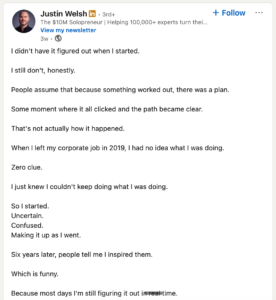
Justin Welsh built a $10 million solo business and grew his LinkedIn following from 2,000 to over 820,000. His post about starting without a plan is a masterclass in vulnerable storytelling.
The post opens with: “I didn’t have it figured out when I started. I still don’t, honestly.”
Then he admits: “When I left my corporate job in 2019, I had no idea what I was doing. Zero clue.”
Why This Works:
The hook immediately breaks the myth that successful people have secret knowledge. Justin positions himself as someone still figuring it out, which makes him relatable instead of distant.
He uses short sentences. They create rhythm. They make the post easy to read on mobile.
The vulnerability isn’t vague. He gives specifics: the year he left, how he felt (uncertain, confused), what he did (started anyway).
Then he pivots to the lesson: “The difference isn’t getting clear on what works. It’s deciding that confusion isn’t a good enough reason to stay stuck.”
Finally, he ends with a soft call-to-action to his free LinkedIn growth guide. The CTA doesn’t feel pushy because he’s already delivered value in the post itself.
How You Can Use This:
Think about a moment when you started something without knowing how it would turn out. Write about that uncertainty honestly. Don’t skip to the success part too quickly. The tension between “I didn’t know what I was doing” and “I did it anyway” is what makes people lean in.
Post Type 2: The Transformation Journey
These posts follow a simple but powerful arc: where you were, what changed, where you are now.
People love transformation stories because they’re aspirational. They show what’s possible when you take action.
Real Example: Simran Pant
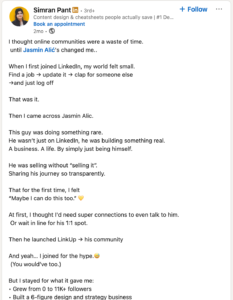
Simran Pant is a content designer in Singapore with over 11,000 followers. Her post about joining an online community shows how transformation doesn’t have to be dramatic to be compelling.
She opens with: “I thought online communities were a waste of time. until Jasmin Alić’s changed me.”
Then she describes her before state: “When I first joined LinkedIn, my world felt small. Find a job → update it → clap for someone else → and just log off. That was it.”
Why This Works:
The before/after contrast is clear. Her “world felt small” paints a picture. You can feel the limitation.
She introduces a turning point (discovering Jasmin Alic and his community LinkUp) and lists specific outcomes:
- Grew from 0 to 11K+ followers
- Built a 6-figure design business
- Got coaching and support
The list format makes her growth tangible. Numbers prove the transformation wasn’t just emotional; it was real.
She ends by asking readers about their own community experiences, turning the post from a story into a conversation starter.
How You Can Use This:
Map your own transformation. What was your “before” state? What triggered the change, and what specific results can you point to?
The key is being specific. Don’t say “I grew my business.” Say “I went from $0 to $100K in revenue.” Don’t say “I learned a lot.” Say “I went from not knowing what I did to confidently explaining my services in one sentence.”
Knowledge & Insight Posts That Establish Authority
Once people know you, they need to trust you. These post types build that trust by showing their expertise.
Post Type 3: Case Study Stories
Case studies prove you know what you’re talking about. The best case studies don’t just share numbers. They tell the story behind those numbers.
Real Example: Guillaume Moubeche
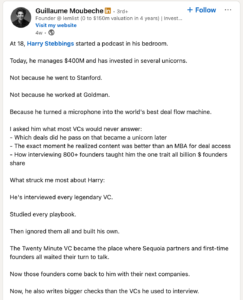
Guillaume Moubeche is the founder of lemlist, which grew from zero to a $150 million valuation in four years. His post about Harry Stebbings demonstrates how to turn someone else’s success into an educational case study.
The post opens with a hook: “At 18, Harry Stebbings started a podcast in his bedroom. Today, he manages $400M and has invested in several unicorns.”
Then Guillaume highlights what makes Harry’s path interesting: “Not because he went to Stanford. Not because he worked at Goldman. Because he turned a microphone into the world’s best deal flow machine.”
Why This Works:
The post immediately establishes credibility (Harry manages $400M) while showing an unconventional path (no Stanford, no Goldman).
Guillaume frames the story as a learning opportunity. He positions himself as the person who asked the hard questions and extracted insights.
The structure is clean:
- The surprising fact (teenager to $400M fund manager)
- The unconventional method (content over credentials)
- The teaser (full conversation in comments)
By studying someone else’s success and sharing what he learned, Guillaume positions himself as someone who understands what drives results.
How You Can Use This:
You don’t need your own case study to use this format. Study someone in your industry who’s done something impressive. Break down what they did. Share what you learned from studying their approach.
If you do have your own results to share, structure them like a story. Don’t just say “We increased conversions by 40%.” Say “We were stuck at 2% conversion for six months. Then we changed one thing. Here’s what happened.”
Post Type 4: Educational Deep Dives
Some posts teach by going deep on one topic. They don’t just skim the surface. They give people something they can actually use.
Real Example: Steven Bartlett
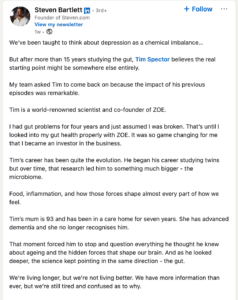
Steven Bartlett is a serial entrepreneur and podcast host with millions of followers. His post about gut health and mental health shows how to make complex topics accessible.
The post opens with: “We’ve been taught to think about depression as a chemical imbalance… But after more than 15 years studying the gut, Tim Spector believes the real starting point might be somewhere else entirely.”
Why This Works:
The hook challenges the way people think. It creates curiosity by suggesting that what “we’ve been taught” might be wrong.
Steven establishes authority by referencing Tim Spector, a world-renowned scientist. He’s not claiming expertise himself; he’s showcasing an expert.
He makes it personal: “I had gut problems for four years and just assumed I was broken. That’s until I looked into my gut health properly with ZOE.”
Personal experience + expert insight = credible content.
He lists specific takeaways readers will get:
- How does gut health affect your mood?
- Why do processed foods make you overeat?
- What are the 8 rules for a healthy brain?
The format creates anticipation. People want to learn those 8 rules.
How You Can Use This:
Pick a topic you know by heart. Find the angle that challenges common assumptions. Structure your post as a teaching moment, not a lecture.
Use lists to make complex information easy to understand. Break big ideas into numbered steps or clear sections.
If you’re not the world’s leading expert, that’s fine. Share what you’ve learned from your own experience or from studying experts in your field.
Post Type 5: Step-by-Step How-To’s
Sometimes people just need instructions. They don’t want philosophy or inspiration. They want to know exactly what to do.
Real Example: Guillaume Moubeche
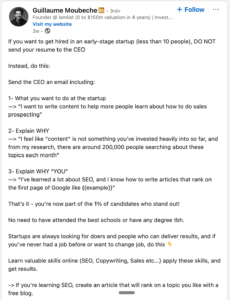
Guillaume’s post about getting hired at startups is pure instruction.
The post starts with: “If you want to get hired in an early-stage startup (less than 10 people), DO NOT send your resume to the CEO. Instead, do this:”
Then he provides a three-step framework:
- What do you want to do at the startup
- Explain why (with research)
- Explain why “YOU” (with proof)
Why This Works:
The headline tells you exactly who this is for (people wanting startup jobs) and what they’ll learn (how to stand out).
The “DO NOT” command creates tension. It suggests the common approach is wrong.
The three-step framework is simple enough to remember and specific enough to execute.
Guillaume backs up his advice with credibility: “I’ve received 10s of thousands of applications in the last years.”
He ends with a bonus tip: “Weekends are usually the best time to send that email.” Small details like this prove he knows what he’s talking about.
How You Can Use This:
Think about a process you do regularly that most people struggle with. Break it into clear steps.
Use numbers or bullets to make the steps obvious. Don’t overcomplicate it. The simpler the framework, the more likely people are to use it.
Add credibility markers (how many times you’ve done this, what results you’ve seen) so people trust your method.
Engagement-Focused Posts That Start Conversations
Not every post needs to teach. Some posts are purely there to get people talking.
Post Type 6: Debate Starters & Hot Takes
Hot takes work because they trigger reactions. They make people want to respond.
The key is backing up your opinion with something real, such as experience, data, or logic.
Real Example: Steven Bartlett
Steven’s post about hiring challenges conventional wisdom about credentials.
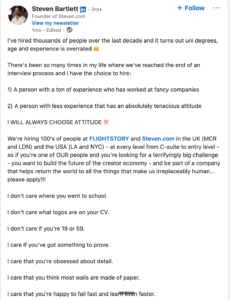
It opens with: “I’ve hired thousands of people over the last decade and it turns out uni degrees, age and experience is overrated.”
Then he sets up a choice: “I have the choice to hire: 1) A person with a ton of experience who has worked at fancy companies 2) A person with less experience that has an absolutely tenacious attitude. I WILL ALWAYS CHOOSE ATTITUDE.”
Why This Works:
The statement is bold but not baseless. Steven has hired thousands of people. He’s not guessing.
He uses formatting (capital letters, emojis, line breaks) to create emphasis and energy.
The post isn’t just an opinion. It’s a job posting. He transitions from “here’s what I believe” to “if you believe this too, apply here.”
He lists what he cares about:
- “I don’t care where you went to school.”
- “I care if you’ve got something to prove.”
- “I care that you think most walls are made of paper.”
The repetition creates rhythm. The specific qualities make his values clear.
How You Can Use This:
Think about a belief you hold that goes against the mainstream in your industry. State it clearly. Then support it with your experience.
Don’t just write for attention. Make sure you actually believe what you’re saying and can back it up.
End with a question or call-to-action that invites people to share their perspective.
Post Type 7: Simple Question Posts
Sometimes the best post is just a question. It doesn’t need to be a long setup, nor does it need to be a story. Just ask something people want to answer.
Real Example: James Clear
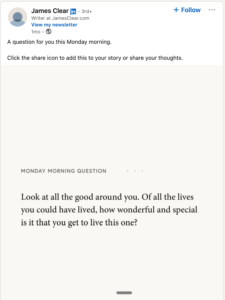
James Clear is the author of Atomic Habits and has built a following by sharing simple yet profound insights. His question post is extremely minimal.
The post shows an image with a question: “A question for you this Monday morning.”
That’s it. The simplicity is intentional.
Why This Works:
Questions lower the barrier to engagement. People can comment without needing to write a long response.
The post works because James already has an audience that trusts him. They know his questions are worth thinking about.
The timing matters. “Monday morning” suggests a reflective start to the week.
Simple questions perform well because the algorithm rewards comments. More comments = more reach.
How You Can Use This:
Ask questions that don’t have obvious answers. Avoid yes/no questions unless you’re running a poll.
Good questions make people pause and think. They tap into experiences, opinions, or preferences.
Examples:
- “What’s one business lesson you learned the hard way?”
- “What’s the best career advice you’ve ever received?”
- “What’s something you believed five years ago that you no longer believe today?”
Behind-the-Scenes Posts That Show Your Process
People are curious about how things work. These posts pull back the curtain.
Post Type 8: Workflow & Tool Reveals
Showing your actual process builds credibility. It proves you’re not just theorizing, you’re doing the work.
Real Example: Paul Storm
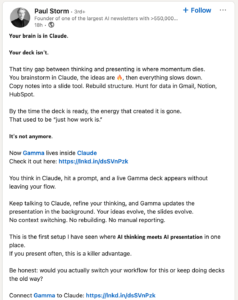
Paul Storm runs one of the largest AI newsletters with over 550,000 readers. His post about using Gamma with Claude shows how to show value through workflow transparency.
The post opens with: “Your brain is in Claude. Your deck isn’t. That tiny gap between thinking and presenting is where momentum dies.”
He describes the problem: “You brainstorm in Claude, the ideas are 🔥, then everything slows down. Copy notes into a slide tool. Rebuild structure. Hunt for data in Gmail, Notion, HubSpot.”
Then he presents the solution: “Now Gamma lives inside Claude. You think in Claude, hit a prompt, and a live Gamma deck appears without leaving your flow.”
Why This Works:
Paul identifies a real pain point. Anyone who’s created presentations knows the frustration of switching between tools.
He shows the before (slow, manual process) and after (seamless integration).
The post isn’t a tutorial. It’s a demonstration of improved workflow. People reading it think “I want that.”
He ends with a question: “Be honest: would you actually switch your workflow for this or keep doing decks the old way?”
The question makes people evaluate their own process, which keeps them engaged.
How You Can Use This:
Share the tools you actually use. Show your process. Screenshot your dashboard. Record a quick video walking through your system.
Don’t just list tools. Explain why you chose them and what problem they solve.
People love seeing the real, messy behind-the-scenes. You don’t need a perfect setup to share. You just need to be honest about what works for you.
Bonus: The Philosophy Post
Some posts don’t fit perfectly into categories. They blend story, opinion, and mindset. They work because they say something true in a memorable way.
Real Example: Justin Welsh
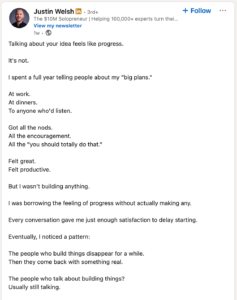
Justin’s post about execution versus talking is pure philosophy.
It opens with: “Talking about your idea feels like progress. It’s not.”
Then he shares his experience: “I spent a full year telling people about my ‘big plans.’ Got all the nods. All the encouragement. Felt great. Felt productive. But I wasn’t building anything.”
The insight: “Ideas are free. Everyone has them. Execution is the whole game.”
Why This Works:
The post challenges a common behavior (talking about plans) that most people recognize in themselves.
Justin admits his own mistake. This makes the advice feel earned.
He closes with proof: “Six years later, it’s an 8-figure business. Not because I had better ideas. Because I finally shut up and built one.”
How You Can Use This:
Think about a principle you learned the hard way. Something you wish you’d understood earlier.
Structure it as: common behavior → personal story → insight → result.
Keep it tight. Philosophy posts work best when they’re short and punchy.
Elements That Ruin Good Posts
Even strong post formats fail when you make these mistakes:
Mistake 1: Writing for the algorithm instead of humans
Stop stuffing keywords. Stop using hashtags that don’t make sense. The algorithm wants engagement. Engagement comes from humans who actually care about what you wrote.
Mistake 2: Posting and disappearing
If someone takes the time to comment, respond. LinkedIn rewards conversations. Posts with active comment sections get more reach.
Mistake 3: Copying instead of adapting
You can study these examples. You should. But don’t copy them word-for-word. Take the structure. Make it yours.
Mistake 4: Being vague
“I learned so much this year” doesn’t give anyone anything. “I learned that raising prices actually increased demand.”
Mistake 5: Ending without direction
Every post should give the reader something to do next, think about a question, apply a lesson, share their own experience, or click a link.
Building Your Own Content System
You don’t need to use all eight post types every week. That’s exhausting and unnecessary.
Pick three or four formats that feel natural to you. Rotate through them.
Here’s a simple weekly rhythm:
- Monday: Share a lesson or insight from the previous week
- Wednesday: Post a question or hot take that gets people talking
- Friday: Tell a story or share behind-the-scenes of your process
Some weeks you’ll skip a day. That’s normal. The goal is consistency over time, not perfection every week.
Build a simple system:
Keep a swipe file. When you see a post you like, save it. Note what made it effective.
Maintain a content bank. Write down ideas as they come to you. Most people run out of content because they wait until posting day to think of something.
Create templates for each post type. Not word-for-word scripts, but structural outlines. This way, you’re never starting from zero.
Repurpose your own content. Turn a story into a question. Turn a how-to into a thread. Extract a single insight from a long post and make it standalone.
Conclusion
Pick one format from this guide. Write one post and publish it. Don’t wait until you’ve mastered all eight types.
The creators who win on LinkedIn aren’t the ones with perfect strategies. They’re the ones who show up consistently and learn by doing.
You already have the stories, the knowledge, the opinions. You just need to start putting them out there.