Get Feedback Before You Post
Generate secure, shareable links that let anyone review your posts with star ratings and comments — no account required.
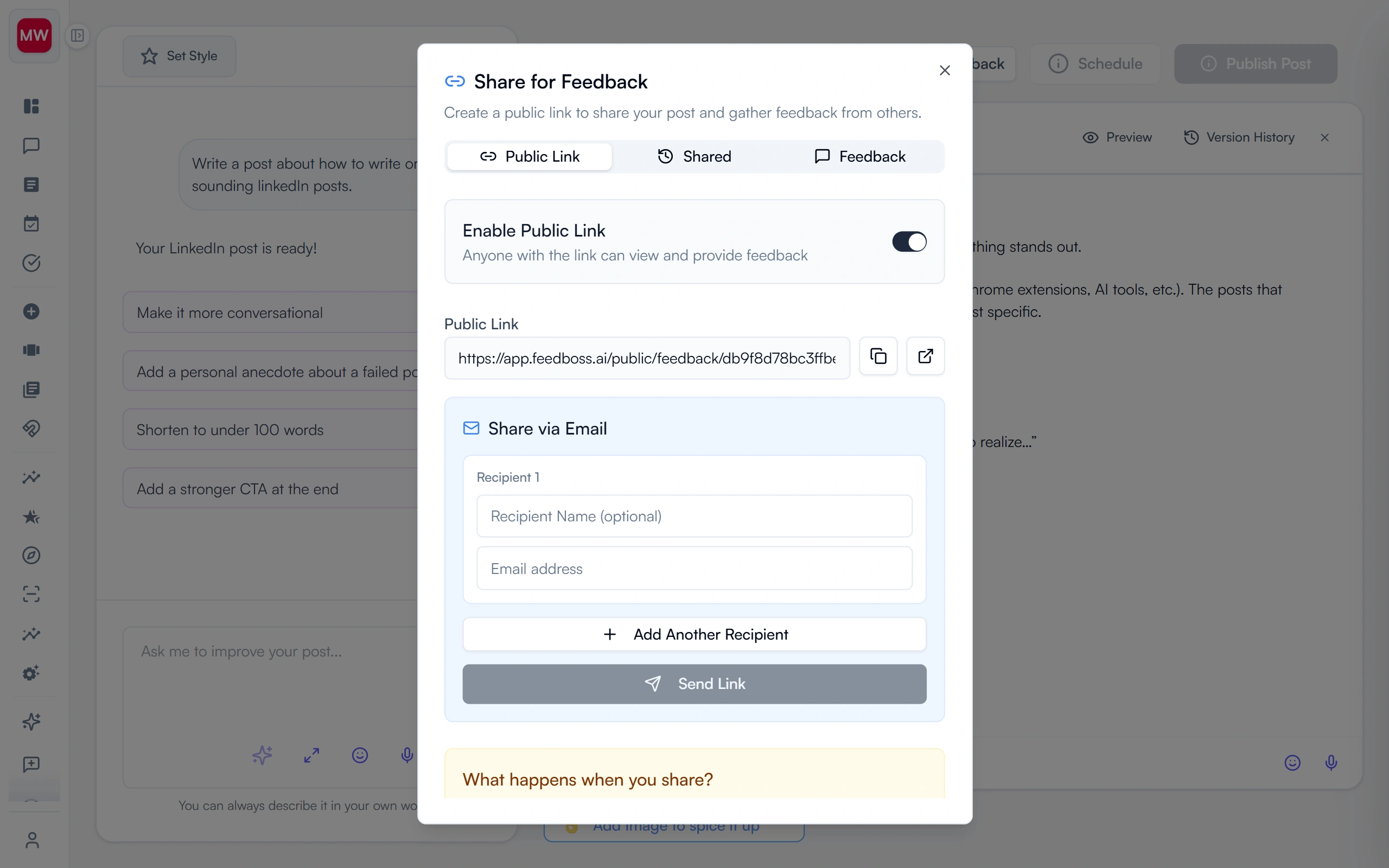
External Review, Zero Friction
Great LinkedIn content often needs a second pair of eyes — a client, a manager, a mentor. But getting feedback shouldn't require adding people to your workspace. Public Feedback Links let you generate a secure, shareable URL for any draft. Reviewers see your post exactly as it will look on LinkedIn, submit a star rating and written comments, and you get notified instantly. No sign-up required. Combine with Team Approvals for internal sign-off after collecting external feedback, or use it standalone as a lightweight review workflow for solo creators and freelancers.
Key Features
Secure Shareable Links
Generate unique URLs for any draft post. Reviewers see the exact LinkedIn appearance — text, images, carousels, and infographics — with no account required.
1-5 Star Ratings
Every reviewer submits a required star rating for quick quality gauging, plus an optional written comment for detailed, actionable suggestions.
Built-in Email Sharing
Send professional review requests with a built-in email tool — up to 10 recipients at once. Track who you have shared with in a dedicated Shared tab.
No Account Required
Reviewers access your post via a link and leave feedback anonymously or with their name. No sign-up, no login, no friction.
Feedback Dashboard
View average ratings, total submission count, individual entries with timestamps, and reviewer details. Get email notifications the moment new feedback arrives.
Link Controls & Spam Prevention
Enable or disable links anytime — all collected feedback is preserved even after deactivation. Rate limiting prevents spam submissions per hour.
How It Works
Activate the Feedback Link
Click "Share for Feedback" on any post, then toggle "Enable Public Link" to generate a unique, secure URL for that specific draft.
Share with Reviewers
Copy and paste the link, or use the built-in email tool to send professional review requests to up to 10 recipients at once.
Collect Ratings & Comments
Reviewers see your post exactly as it will appear on LinkedIn. They submit a required star rating (1-5) and an optional written comment — no account needed.
Review Feedback & Publish
Check your feedback dashboard for average ratings and individual comments. Refine your post based on the insights, then publish with confidence or submit for Team Approval.
Who It's For
Built for LinkedIn creators at every level
Agencies with Client Approval Workflows
Get client sign-off on LinkedIn posts before publishing without giving clients access to your workspace. Share a secure link, collect star ratings and comments, then submit through Team Approvals for internal sign-off before scheduling.
Individual Creators & Freelancers
Run your drafts past a trusted mentor, peer, or audience member before hitting publish. A second set of eyes catches tone issues, factual errors, and missed opportunities — all without them needing a FeedBoss account.
Teams Needing External Review
Involve stakeholders outside your workspace — legal, compliance, or executive review — without creating additional accounts. Reviewers access the post via link, leave feedback, and you maintain full control over the publishing decision.
Content Mentorship & Coaching
Share practice posts with advisors for developmental feedback. Mentors can rate and comment at their convenience, helping you improve your LinkedIn content quality over time.
Frequently Asked Questions
Do reviewers need a FeedBoss account?
How many people can review a single post?
Can I disable a feedback link after collecting responses?
Is the feedback anonymous?
How does this work with Team Approvals?
Related Features
Explore more tools in the FeedBoss platform
AI Post Generator
Generate publish-ready LinkedIn posts in single or batch mode with AI that learns your voice.
Learn more →Content Calendar
Plan and schedule posts weeks in advance, or auto-generate a full month of content in seconds.
Learn more →Lead Magnets
Create checklists, swipe files, templates, and frameworks to grow your email list and authority.
Learn more →Team Approvals
Role-based approval workflows to ensure brand consistency before any post goes live.
Learn more →Your LinkedIn Presence Starts Here
Try FeedBoss free — no credit card, no commitment. Your first post in under 2 minutes.
Start Creating FreeFree trial. No credit card required.