Ride the Trend. Research in Seconds.
See what your audience cares about right now — then research it with AI and post before the moment passes.
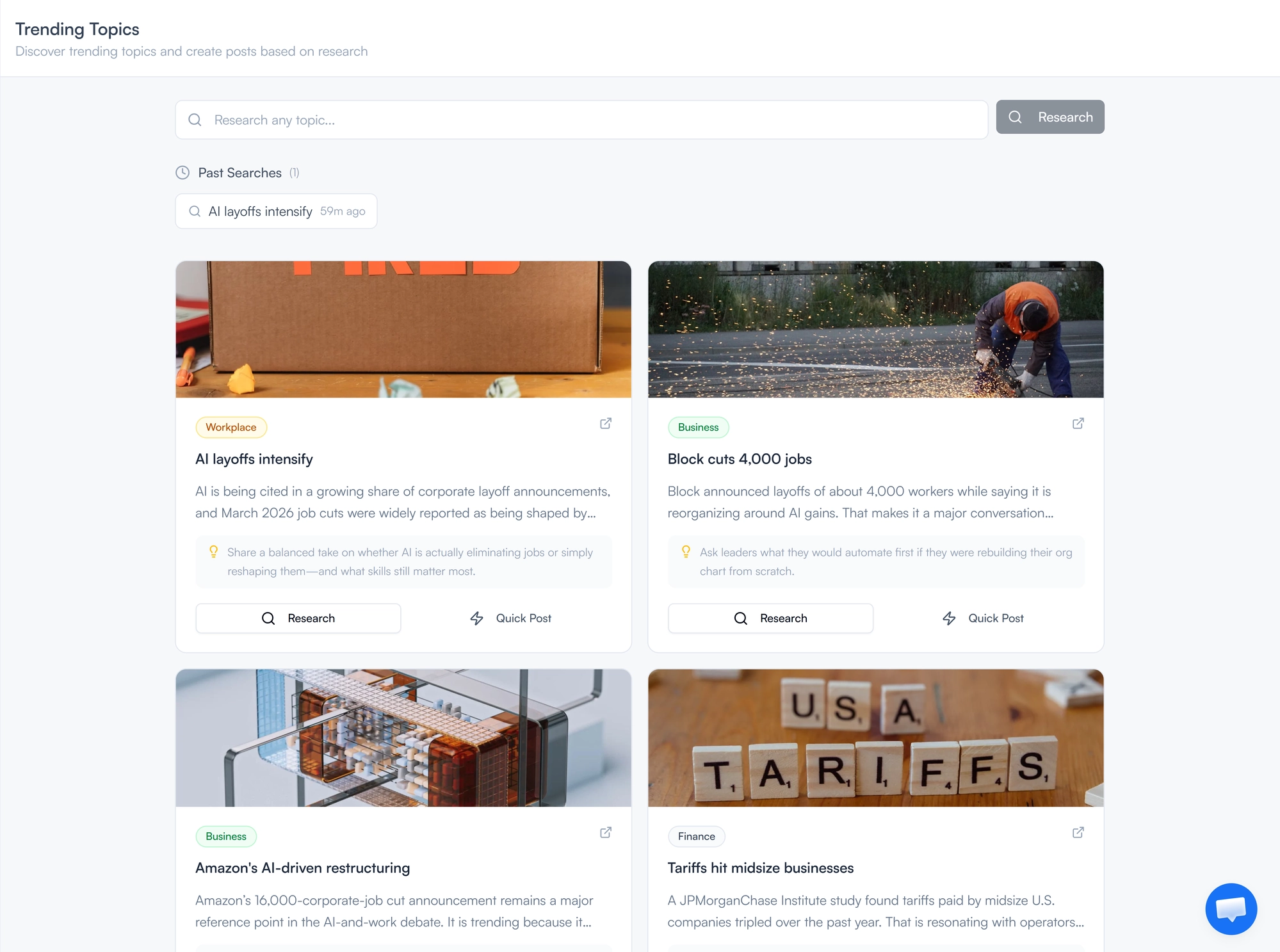
From Trending Topic to Published Post in Under a Minute
Trending moments are gone in hours — most creators miss them because research takes too long. FeedBoss surfaces fresh topics in your niche every day, each with a source link and a suggested LinkedIn angle. Click Quick Post to write immediately with the AI Post Generator, or click Research for a full brief in 5–15 seconds: key points, different perspectives, recent developments, post ideas, and supporting stats. Not on the trending list? Search any topic and get the same AI research brief instantly.
Key Features
Daily Trending Topics
Fresh topics every day, each matched to your niche with a source link and a suggested LinkedIn angle.
Quick Post
Generate a post immediately from the topic title, description, and angle. One click to the editor.
AI Research Briefs
Get a full brief in 5–15 seconds: summary, key points, perspectives, recent developments, post ideas, and stats.
Custom Topic Research
Not on the trending list? Type any topic into the search box and get the same AI research brief instantly.
Post Ideas with "Use This"
Each research brief includes specific post angles. Pick one and generate a focused post from that angle alone.
Past Searches
Every topic you research is saved. Reload any previous brief instantly — no re-fetching, no quota spent.
Session Caching
Research results stay cached for your session. Reopen a panel and your results are there immediately.
How It Works
Find a topic
Browse the daily trending grid or search any topic of your own.
Research or Quick Post
Hit Quick Post to go straight to the editor, or click Research to get a full AI brief in under 15 seconds.
Generate your post
Use a specific post idea from the brief, or generate from the full research. Your post is ready to publish.
Who It's For
Built for LinkedIn creators at every level
Creators Who Want to Stay Relevant
The trending grid shows you what your audience is already reading and talking about. You show up with a take before the conversation moves on.
Thought Leaders Who Need Depth
Quick takes are easy. What sets you apart is an informed perspective backed by facts. The research brief gives you the context to say something worth reading.
Busy Professionals With No Time to Research
You know what you want to post about. You just do not have 30 minutes to dig up the stats and angles. Research does it in 15 seconds.
Frequently Asked Questions
How fresh are the trending topics?
Does researching a topic use my monthly quota?
What is in an AI research brief?
Can I re-research a topic for fresher data?
Related Features
Explore more tools in the FeedBoss platform
AI Post Generator
Generate publish-ready LinkedIn posts in single or batch mode with AI that learns your voice.
Learn more →Authority Map
Visualize your content strategy with topic clusters, authority scores, and AI-generated ideas.
Learn more →Analytics Dashboard
Track engagement trends, follower growth, and content performance with interactive charts.
Learn more →Popular Posts
Discover viral LinkedIn content trends by keyword, author, or niche and remix winning formats.
Learn more →
Ready to own your LinkedIn
in 3 simple steps?
Pick your voice
Set your tone, topics, and style. FeedBoss learns how you write so every post sounds like you.
Generate & customize
Get AI-drafted posts, carousels, and hooks in seconds. Edit or publish as-is.
Post & grow
Schedule content, track what works, and watch your audience grow week over week.