Team Approval Workflows
Ensure content quality and brand consistency. Members submit, admins review - every post goes through your approval process.
Nothing Goes Live Without Sign-Off
When multiple people create LinkedIn content for your brand, quality control is everything. FeedBoss Team Approvals gives you a five-stage Kanban workflow with role-based permissions - Members create and submit, Owners and Admins review and approve. Every action is tracked with timestamps and feedback notes, creating a forward-only audit trail that prevents unapproved content from going live. Posts flow from Draft to Pending to Approved to Scheduled, and they can never move backward. Pair this with Public Feedback Links for external stakeholder review, or the Content Calendar for scheduling approved posts.
Key Features
Role-Based Permissions
Three distinct roles - Owner, Admin, and Member. Owners and Admins approve, reject, or request changes. Members create drafts and submit for review. Everyone stays in their lane.
Five-Stage Kanban Board
Visual workflow with Drafts, Pending Approval, Changes Requested, Approved, and Scheduled columns. Drag-and-drop simplicity with enforced forward-only transitions.
Review Actions with Feedback
Approve posts for scheduling, request changes with detailed notes, or reject with documented reasons. Feedback appears in post details and member email notifications.
Complete Approval History
Every submission, approval, rejection, and status change is tracked with timestamps and reviewer identity. Full lifecycle visibility for compliance and accountability.
Automatic Email Notifications
Members get notified when posts are approved or need changes. Admins receive alerts when new content is submitted for review. No one misses a beat.
Forward-Only Audit Trail
Posts cannot move backward through stages - preserving audit integrity and preventing unapproved content from reaching publishing without proper sign-off.
How It Works
Members Create & Submit
Team members compose posts using the AI Post Generator or editor, then click "Submit for Approval" instead of publishing directly. The post moves to Pending Approval.
Admins Get Notified
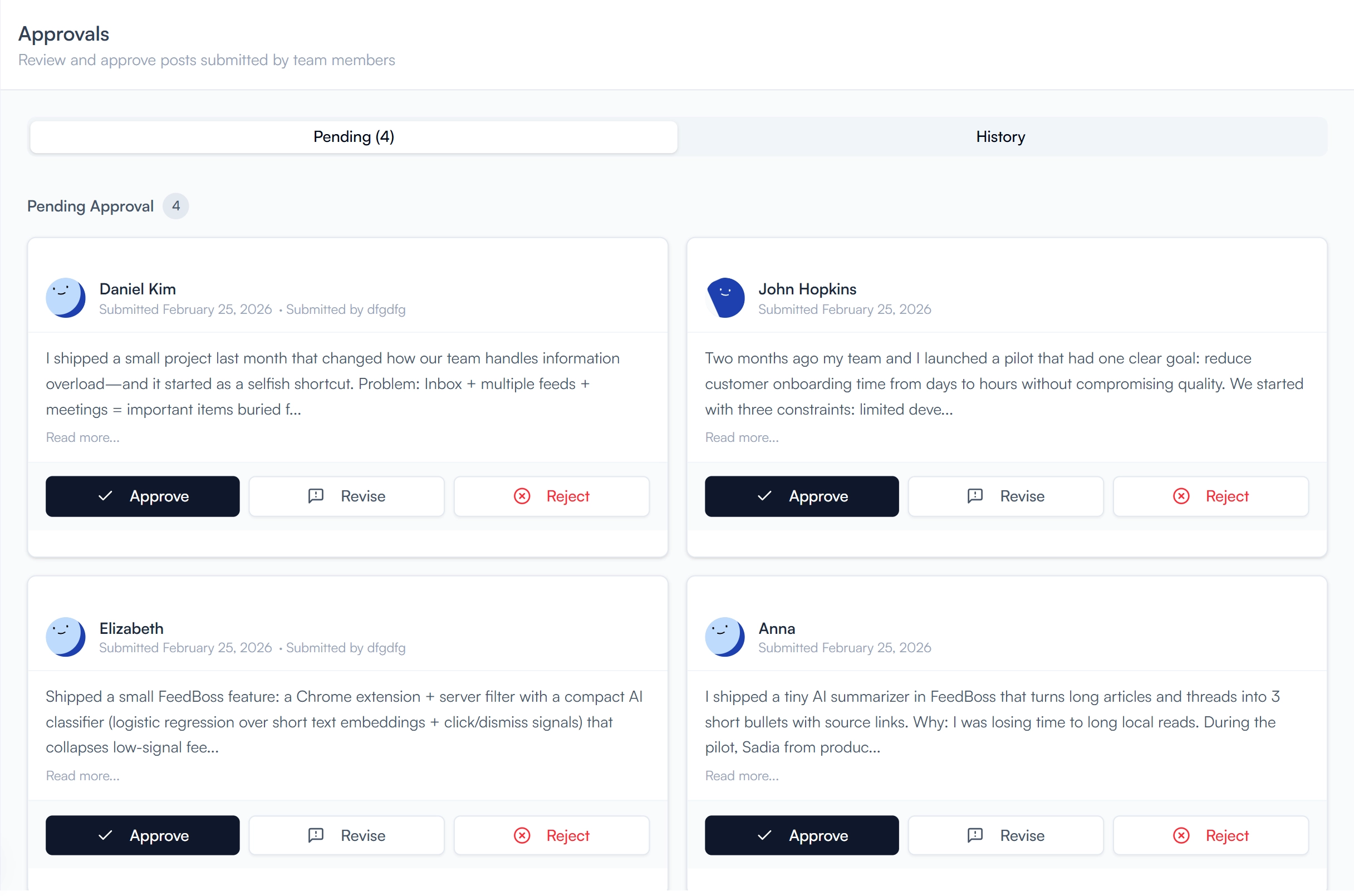
Owners and Admins receive an email notification and can review submissions from the dedicated Approvals page or the Kanban board.
Review & Take Action
Approve the post for scheduling, request changes with specific feedback notes, or reject with documented reasons. Notes are sent to the member via email.
Schedule & Publish
Approved posts move to the Approved column and can be scheduled via the Content Calendar or published immediately by an Owner or Admin.
Who It's For
Built for LinkedIn creators at every level
Marketing Agencies
Manage LinkedIn content for multiple clients with a structured review process. Members create drafts using the AI Post Generator, admins approve, and nothing goes live without the right sign-off. Use Public Feedback Links to loop in clients for external review before publishing.
Brand & Communications Teams
Ensure every LinkedIn post meets brand standards before publishing. The five-stage Kanban workflow and feedback notes keep everyone aligned. Combine with Content Styles to enforce consistent tone and the Content Calendar for scheduled publishing.
Enterprise & Large Organizations
Scale LinkedIn presence across departments without risking off-brand messaging. Role-based permissions give team members creative freedom within defined guardrails. The forward-only audit trail provides compliance documentation for regulated industries.
Freelancers Managing Client Accounts
Give clients visibility into what you are posting on their behalf. Submit drafts for their approval, collect feedback via the built-in approval notes, and maintain a documented history of every decision.
Frequently Asked Questions
Which plan includes team approvals?
Can members publish posts directly without approval?
What happens after a post is approved?
Is there an audit trail for approvals?
Can I get external feedback before internal approval?
Related Features
Explore more tools in the FeedBoss platform
AI Post Generator
Generate publish-ready LinkedIn posts in single or batch mode with AI that learns your voice.
Learn more →Analytics Dashboard
Track engagement trends, follower growth, and content performance with interactive charts.
Learn more →Content Calendar
Plan and schedule posts weeks in advance, or auto-generate a full month of content in seconds.
Learn more →Public Feedback
Share posts with external reviewers for star ratings and written comments before publishing.
Learn more →Ready to own your LinkedIn?
Pick your voice
Set your tone, topics, and style. FeedBoss learns how you write so every post sounds like you.
Generate & customize
Get AI-drafted posts, carousels, and hooks. Edit or publish as-is.
Post & grow
Schedule content, track what works, and watch your audience grow week over week.